Sunday, 4 February 2018

Instagram Introduces Text-only Status Updates

Very recently, I posted an article suggesting that Instagram was working on a new update that will bring Video calling to instagram. Today's post however, is about a new feature was just introduced into the platform, the new update being Text-only statues.
With the latest Instagram update, you can now posts stories with just text with the new Type Mode a feature which has previously been seen on whatsapp and facebook stories.
Instagram text status

To use the new feature, open Instagram’s camera feature you should see “Type” next to “Normal” under the record button. You can then simply tap on the “Type” option to start writing whatever you want for your story post.
You can also customize the post by adding different colored backgrounds, along with different choices for fonts and sizes. You can also highlight specific words or phrases in your post. You may also decide to use a photo as the background image for your text status.
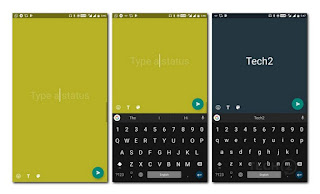
Instagram text status
The new font styles can also be used if you want to add text to any photo or video post. Just like normal story posts, the Type Mode option posts will disappear after 24 hours. To get the new feature, simply update your instagram app on the google Play Store.

Friday, 19 January 2018

Truecaller Introduces Backup Feature For Its Android App

Truecaller, the popular caller ID app, has launched a new feature "Truecaller Backup for Android", which allows users to backup and restore their contacts, call history, block list, and settings.

truecaller backup

The feature comes in handy when you’re switching to a new phone, getting a new SIM card, or resetting your device. Truecaller Backup simplifies transition to a new phone without losing contacts, call logs, etc.

For example, I recently lost my simcard causing me to lose all contacts, my only saving grace was that I previously synced my contacts with Google which backed some of my lost contacts, so I got about 60% of the lost contacts due to inconsistent syncs(beats losing them all right?)

At first, the backup will be hosted only on Google Drive but the company plans to expand the options to other backup storage soon.
Users can customize how often the backup takes place between daily, weekly, monthly, and on-demand.

The Truecaller Backup for Android feature has been rolled out already, but it will officially be available to users  over the next couple of days.

Thursday, 18 January 2018

How To Download And Install Android One Launcher On Your Android Device

The Android One launcher is an android launcher which is very similar to the launcher found on the Google Pixel, most of the difference are in the looks, and it also supports a fully working version of the Google Now panel a feature which is hardly seen on other launchers.

how to install android one launcher

The Android One launcher gives your android device a very stock Android-like look without going through too much trouble tweaking your android device. You can download the Android One launcher here, but make sure you don’t have the Google Pixel Launcher or Android One Launcher already on your device before installing it.

Wednesday, 3 January 2018

Telegram's Android App Now Supports Multiple Accounts

Telegram, one of the top instant messaging apps decided to welcome the new year by introducing a new feature to their android app.

The new version 4.7 of the Telegram app comes with support for multiple accounts; which means you can log in different accounts(maximum of three) on the same app on the same device. With the new feature, you can easily switch between the different accounts. You also get notifications from all accounts regardless of which one is currently active
telegram multiple accounts
At the moment the feature is only supported on the android platform but iOS users got something new too.
iOS users can now change the appearance setting on their app, switching between several themes including dark themes for night-time.

Though switching appearance settings on the app is cool but not as cool as multiple accounts

Wednesday, 27 December 2017

Whatsapp To Stop Working On These Platforms Come December 31st

According to a blog post on WhatsApp blog, WhatsApp will stop working on some smartphones and mobile platforms in the new year(2018).

From 1 January 2018, the messenger app won’t work on any device running Windows Phone 8.0 (or older versions of the operating system), BlackBerry OS or BlackBerry 10.

According to whatsApp, “When we started WhatsApp in 2009, people’s use of mobile devices looked very different from today. The Apple App Store was only a few months old. About 70 percent of smartphones sold at the time had operating systems offered by BlackBerry and Nokia,” it reads.
whatsapp stop support for devices
“Mobile operating systems offered by Google, Apple and Microsoft – which account for 99.5 percent of sales today – were on less than 25 percent of mobile devices sold at the time.”

See Also: Whatsapp End Support For Blackberry Devices, Some Windows And Others

The platforms that are being unsupported are unpopular, and have been for some time. The company ended support for Nokia Symbian S60 devices back in June.

They are also planning to stop support for Nokia S40 devices on 31 December 2018 and phones running Android versions 2.3.7(GingerBread) and older on 1 February 2020.
Although these devices are still supported, WhatsApp is no longer actively developing for them, which means some features could stop functioning at any moment.

“While these mobile devices have been an important part of our story, they don’t offer the kind of capabilities we need to expand our app’s features in the future,” the company's blog post said..

“This was a tough decision for us to make, but the right one in order to give people better ways to keep in touch with friends, family, and loved ones using WhatsApp.

“If you use one of these affected mobile devices, we recommend upgrading to a newer Android, iPhone, or Windows Phone."

I don't think this would affect a lot people because I doubt people still use the targeted devices.

Friday, 24 November 2017

UC Browser Has Returned To Google Playstore

About a week ago, Alibaba group's popular browser UC browser was taken off the google playstore however, it has returned to the popular App store.
Reason for its removal being that UC Browser was allegedly using unhealthy and misleading practices to promote its app.

UC browser back in playstore
According to the group, this has been rectified in the latest build which was uploaded to Google Play. The company in a statement said the new version is available for users with updated technical settings strictly in line with Google Play's policy.

UC browser currently has over 500,000 installs on play store and it is without a doubt one of the fastest browser when it comes to downloading stuffs online.

After all the craziness, UC browser is back online and you can get it from the google play store now.

I'll try to install the app, see if I can spot any differences.

Monday, 25 September 2017

Twitter Bringing Its Data-saving 'lite' App To Developing Countries

Twitter Lite was launched earlier this year as a Web app. However now, Twitter is packaging its data-friendly, space-saving Lite mobile web app into a regular app version, starting with Android.

Twitter lite

Twitter is currently testing out the Android app only in the Philippines for now, which might lead to a large scale later on.

The Twitter Lite app takes up less space on your device (less than 3MB), and demand less resources, so it can load faster on low-end to mid-range smartphones.

More importantly, the app is made to work under poor network conditions, so it'll have some caching to work offline. It'll also show a preview of images and videos, and will only download media if the user chooses to.

Remember that Facebook launched its low-data version, Facebook Lite on Android two years ago.

By February this year, Facebook Lite already grew its user base to 200 million.

Sunday, 2 July 2017

Google Launches New Experimental Data Saving App 'TRIANGLE'

One major challenge most smartphone users face is the issue of data usage and Google has brought a solution to the problem.

Though this isn't the first time Google is coming up with a means to save data as there's a data saving option present on the chrome browser.

But the new Triangle app offers something better.

Google triangle data saver
 Google is testing a new app called Triangle, the app allows users to customize how apps are allowed to use data by choosing between options like 10 minutes at a time, 30 minutes or “Always.”


The app shows you which apps are using your data the most and gives you an option to suspend them.

For people that have problems with background apps draining their data, you will value this app the most.


Officially, Google is testing this app in Philipines but you can download it from APK mirror here and watch the app help you with your data saving issues.

Thursday, 22 September 2016

Google Launch Allo The Smartest Messaging App

If you're ever going to create a new messaging app, it had better be something unique. In this time, finding a place amongst popular messaging app like Facebook Messenger, WhatsApp and iMessage is not an easy task. When Google launched Hangouts back in 2013,it didn't really pull it off.

So Google is coming back again with Allo, a messaging app that uses the company's biggest strengths to stand out from other messaging apps. That strength is the famous 'Google search'.

Google messaging app

The Allo app is greatly integrated with the Google Now chatbot. Making it the smartest messaging app out there.
You can ask what tomorrow's weather would look like, suggest replies to conversations, get travel information and many more.

Just like the recently launched Duo Video Calling App, Allo is a mobile-only app. It doesn't have a web version.

To sign up for Google Allo, you use your phone number and attach your Google account. Allo users on your contact list will automatically display, while those who aren't on the service can easily be invited to download the app.

To download the new Allo app,