Wednesday, 22 February 2017

Whatsapp Introduces Whatsapp Status Snapchat-Like Feature

From all indications, Mark Zuckerberg is going all in with WhatsApp and doing everything humanly possible to keep whatsapp as the largest Instant messenger app in the world.
Just like Instagram codedly stole the ‘stories’ feature from snapchat, he just added the feature to his IM app, whatsapp. The new feature lets you express yourself using a short video.

The new status feature will allow you to share photos, videos, and GIFs as your status(i.e. stories) which will auto-destruct in 24 hours. The feature was tested in November last year, and was pushed to beta testers last week.
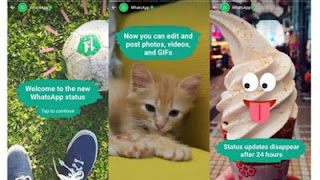
whatsapp snapchat status
You will also have the ability to control who sees your statuses. Starting with the Netherlands and France, the feature will gradually roll out for both iOS and Android to other markets.

I must say this is a really interesting addition to WhatsApp to help make your statuses much interesting.

Monday, 13 February 2017

How To Activate Two-Step Verification On Your Whatsapp

Are you really serious about your security on whatsapp and end-to-end encryption just isn't enough for you?
if your answer to the question is yes, then this post is for you.
Before I continue with the post, I want to sincerely apologize for my inactivity lately, you know I'm still a student and its kinda hard juggling school work and blogging.
Moving on, what is two-step verification?
Two-step verification is an enhanced security measure that adds a second layer to the log-in process, making it more difficult for intruders to access your account.

Although This feature has been available for beta testers for a while now, it just rolled out to the official version of the chat app for regular WhatsApp users.

How to TURN-ON Two-Step Verification on WhatsApp?
First of all, make sure you are running the latest version of WhatsApp

Go to account settings in WhatsApp, click on the new Two-step verification option. You'll an Enable button on the next screen that shows.

Whatsapp two step verification


Select a 6-digit passcode that you'll be asked for each time you try to register your phone number with WhatsApp, and confirm it.
NOTE: Pick something you can easily remember to avoid troubles in the future.

You also need to provide an email address that will be used to reset your passcode just in case you forget it.
Once that's done, two-step verification will be active on your whatsapp account, no one will be able to activate WhatsApp with the same phone number unless they have the passcode or access to the email account to reset it.

Tuesday, 7 February 2017

How To Watch Big Brother Naija Directly From Your Smartphone

The Big Brother show needs no introduction. The 2017 edition of Big Brother Naija aka BBN kicked off around late January, 2017 and so far, it has gathered a lot of viewers.

If you are a regular social media user, you must have heard people talk about the show either on Facebook or Twitter. Most times, they would be be talking about their favorite housemates.
 Watch Big brother Naija 2017 show
In case you don't know, Big Brother Naija 2017 airs on DSTV and GoTV. However, you can't possibly be around to watch it all the time.

This is where being able to watch the show online comes to play. And it is very easy.

How to Watch Big Brother Naija 2017 Show Online
A BBN dedicated YouTube channel has been created so you can easily tune in and join the show easily.
To watch, simply subscribe to ToxiC Pattat YouTube Channel HERE or Piccitoxin YouTube Channel HERE.
After that, follow the live streaming link and enjoy!

Remember to keep an eye in your data o!

Elephone’s Dual 360° Will Allow You to Shoot 360-degree Videos on Your Smartphone

Virtual Reality has been around for a while now and it seems to be the 'future' output device with loads of 360° video recording cameras. But is that the only way to record VR videos?

Elephone’s 360 degree camera

Your favorite chinese smartphone maker, Elephone disagrees with that as they unveils a new gadget that you can take with you everywhere you are go.
The new ElePhone Dual 360° camera is designed to be an add-on to your smartphone, it is very portable and light, so that you can effortlessly travel with it.


The gadget connects to your smartphone through the micro USB or USB type-C (hopefully) port and allows you to record VR-like videos.
Elephone’s 360 degree camera
This smartphone accessory will feature two 180° degree cameras, one on the front and one on the back, together, they create 360° videos.

The gadget will be available soon and pocket friendly. Virtual reality has never been so easy. Keep it in your pocket and attach it to your phone to get a panoramic shot

Monday, 30 January 2017

Android 7.0 Nougat Update Coming To Infinix Note 3 Pro

Upgrading smartphones to the Latest version is just.... Beautiful!
I remember when I updated my Infinix Hot Note from 4.4 kitkat to 5.1 Lollipop, it was amazing because it felt like I got a new phone... New features, new look, everything felt new.

From what I'm hearing, it seems the latest Android version which is Android 7.0 Nougat would be coming to Infinix Note 3 Pro soon.

Infinix Note 3 Nougat update

Infinix Note 3 Nougat upgrade
I believe, this is a sign that other Infinix devices might soon get fresh system updates. So if you are using an Infinix Note 3 Pro, get ready to welcome Android 7.0 Nougat into your device.
Infinix Note 3 7.0 upgrade
Now, I dont know if the 7.0 update would be available for the regular Note 3 or if it's for the pro version only but we have to cross our fingers and see what happens.

Monday, 23 January 2017

How To Install Whatsapp On Your BB10 Device

Sometime last year, Whatsapp announced that it was stopping support for some devices including BB10 devices.
It appears they are keeping true to their word because few days ago, a lot of users reported that they got this message when they tried to open their WhatsApp
“You can’t send messages to this chat because WhatsApp no longer supports this phone”

What this means is that Whatsapp is no longer supported on BB10 devices.

How to install WhatsApp on BB10
However though, one advantage Blackberry 10 has over all the other non-supported devices is its ability to run Android apps hence, this gives you a bit of hope that you can still use WhatsApp on your Blackberry 10 device.

I’m going to quickly guide you on how to install WhatsApp on Blackberry 10 in a few minutes.

How to Install WhatsApp on Blackberry 10 Devices

1. On your BB10 device go to Settings > App Manager > Installing Apps and enable installations from unknown source.

2. Download the latest version of WhatsApp apk here.

3. Run and install it on your device

Once the manual settings are completed, your WhatsApp should run normal without seeing the dreadful message of your device not supported.
But if this doesn't fix the problem, I think its about time for you to upgrade your device to a support device.

Saturday, 21 January 2017

New POTUS Donald Trump Beloved Android Taken Away

Yesterday was the inauguration of the new President Of The United States(POTUS) Donald Trump and the new president was forced to give up his Android device with which he loves to tweet before his inauguration, trading it in for a more secure handset approved by the Secret Service, The New York Times reported.

He’s also getting a new cellphone number, which only a few people will have.

Obama said his Secret Service-approved phone was stripped of all its fun features, saying Trump may not be able to tweet from it. If you follow Trump on Twitter, you'll know he loves to tweet!

According to Obama, “It doesn’t take pictures, you can’t text, the phone doesn’t work . . . you can’t play your music on it,” he said on “The Tonight Show.”

Saturday, 14 January 2017

Newly Launched Nokia 6 Android Device Cracks Walnuts

Whenever you hear the name "NOKIA", one thing comes to mind... DURABILITY. Long ago, people used to teased that when a Nokia phone hits the ground, the ground breaks.
Although that isn't true, you've got to admit that Nokia phones were really strong.

When I heard that HMD would be handling the production of Nokia phones, I thought they wouldn't be able to keep up the good name. But it seems they are!

In a new YouTube video, the new Nokia 6 was used to smash a walnut (both the front and back was used) you can watch the video below;


The tester in the video used both the front screen and the back casing to attempt to break the walnut and it did break the shell without any damage to the Nokia 6’s display or body, not even a scratch.


A few days back, Nokia teased the Nokia 6 as having a military grade body that can withstand a wide range of extreme conditions,such as extreme temperature, high humidity, snow, water etc.

The monster device will go on sale starting from January 19 2017.

Wednesday, 11 January 2017

Introducing ASUS Zenfone AR The First Smartphone With 8GB RAM

Remember last year, LeEco announced that it going to launch the first Smartphone with 8GB of RAM although it seems ASUS beat them to the race.
Few days ago at CES 2017(The largest tech show on the planet) Asus announced two new smartphones, both of which have been in the rumors a lot recently. The devices we're talking about is the Zenfone AR and the Zenfone 3 Zoom.

Asus Zenfone AR is a smartphone that is trying to take us into the future, it is the first ever smartphone capable of both VR and AR, it's also the second-ever Tango-compatible Android device. It has a large camera set-up that looks like Nokia's now-gone Lumia smartphone line-up.
Asus Zenfone AR

The Asus Zenfone AR is a sleek, 5.7" device with: a high-res Quad HD display, a fingerprint scanner, it is powered by a Qualcomm Snapdragon 821 chipset aided by a whopping 8GB of RAM and its Augmented Reality(AR) abilities is the cherry on the icing.

The main camera is a 23-MegaPixel Sony IMX318 sensor, with OIS, EIS, and 4K video recording. Also, thanks to Google's Tango requirements, there's also a motion tracking camera and a fisheye depth-sensing camera on the back of the device.

The Asus Zenfone AR release date is due for the second quarter of 2017

Monday, 9 January 2017

Landscape Ideas For Your Garden

Landscape Ideas For Your garden

After whole eternity of messy working days, we all seek to finally indulge ourselves in our favorite chair under the biggest tree in our precious garden. But your garden also requires your diligent work in order to create the place where you can relax and completely forget about all your troubles. In this post we will talk about how to change the design of your garden or create a totally new one to make it a dream place.

Initially you should focus on those elements that are needed for your garden, i.e. indispensable elements. For example, you can remove the parking outside the territory of your garden, because it takes a lot of space. You can use free space for the establishment of a zone of rest.

If you have too little space for arranging your garden, you should think of how to expand your garden visually. For this purpose, it is necessary to take into account the following issue: the tracks should be winding, and the lawn should have a round shape. Observing these simple rules, you can significantly expand the space. If your site has a small square, cut all large trees and plants, they take up too much space.
Landscape Ideas For Your garden

The best fruit trees for the garden are dwarf trees - they take up little space and look great. To save space for flowers or lawn, you should plant the trees in a checkerboard pattern. Designers often use the following technique: they plant light shade plants in the foreground and dark and cool shade plants in the background. This way, you can visually expand the area of the garden.

A great idea for any garden is creating an open area or gazebo, in other words a place for relaxation. In the end, a garden associates with rest and integument. So you should carefully think over this particular part of your garden.
Landscape Ideas For Your garden

We should not forget about the fundamental mistakes that people make when it comes to design. For example, people contain too many elements of landscape design, although their land is too small.
 Another mistake is choosing plants for the garden, which cannot be combined between each other. If you select all the most beautiful and original exotic plants and plant them on your site – the garden will look unnatural. We must not forget that every exotic plant grows in all alone and a garden of exotic plants will inevitably look strange. It is better to plant simple and common plants and thus achieve pleasant holistic view.
Landscape Ideas For Your garden

Don`t know where to find the best stuff for your garden? Buy garden goods on Jiji! Jiji is a popular Nigerian marketplace where you can buy anything you need. Here you can find goods in all kinds of categories! Buy new or used stuff and save your money!